The Chrome Extension for Clio Document Uploads
Upload files to your Clio matters from any website. Right-click a download link, select your matter, done. No downloads folder, no manual uploads.
 Send to Case
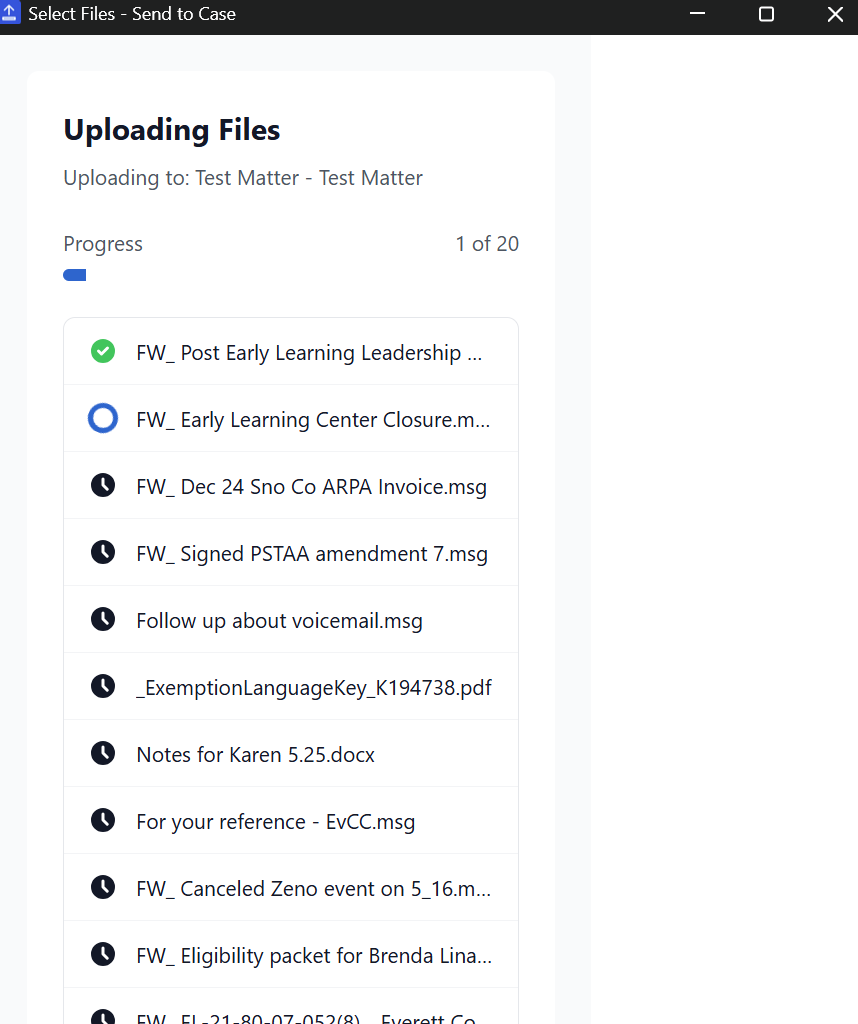
What This Clio Extension Does
A browser-based alternative to the download-upload workflow.
Right-Click Any Link
See a document you need? Right-click the download link and send it straight to Clio. Works on any website - court portals, email, insurance sites, anywhere.
Batch Page Scanning
Need multiple files from one page? Scan the page to find all downloadable documents, select the ones you want, and upload them all at once.
Automatic Zip Extraction
Upload a zip file and Send to Case extracts the contents automatically. Each file goes to your matter individually, ready to use.
Drag & Drop Upload
Already have files on your computer? Drag them into the extension popup and upload directly to Clio without navigating to Clio first.
Folder Selection
Choose exactly where files go. Browse your matter's folder structure or set a default folder for repeat uploads to the same location.
Quick Matter Search
Find your matter instantly with fuzzy search. Start typing the client or matter name and your recent matters appear first.
How to Install the Clio Chrome Extension
Get set up and uploading documents in under two minutes.
Visit Web Store
Go to the Chrome Web Store and find Send to Case.
Add to Chrome
Click "Add to Chrome" and confirm the installation.
Pin Extension
Click the puzzle icon and pin for easy access.
Connect Clio
Sign in with your Clio account using secure OAuth.
Start Uploading
Right-click any link and select "Send to Clio".
Security & Privacy Built In
Your client data deserves protection. Here's how this Clio extension keeps it safe.
Direct Upload
Files go straight from Chrome to Clio. We never see your documents.
Official OAuth
Clio's secure authentication. We never see your password.
Local Storage
Settings stay on your device. Nothing stored on our servers.
Privacy First
No file names in error logs. Your data stays private.
Where Legal Professionals Use This Extension
Real scenarios where Send to Case saves time every day.
Court Portals
Upload filings from PACER, CM/ECF, and state court systems directly to your matters.
Insurance Portals
Save claim documents, medical records, and policy files from carrier websites.
Webmail
Upload email attachments from Gmail, Outlook web, or any browser-based email.
Evidence Sites
Download photos and documents from evidence sharing portals and body cam footage sites.
Government Agencies
Save records from FOIA responses, agency portals, and public records databases.
E-Signature Platforms
Upload signed documents from DocuSign, PandaDoc, or any e-signature notification email.
Chrome Extension FAQ
Common questions about the Send to Case browser extension.
Is there an official Clio Chrome extension?
Clio offers Clio Drive for desktop file sync. Send to Case is a third-party Chrome extension that provides a different workflow - instead of syncing folders, it lets you right-click any download link to upload directly to Clio without downloading first.
What can I do with the Send to Case Chrome extension?
Send to Case lets you upload files to Clio matters from anywhere: right-click download links, drag and drop files, scan pages for downloadable documents, and extract zip files automatically. All without leaving your browser tab.
Is the Clio browser extension free?
Send to Case offers a free tier with 10 uploads per month. No credit card required. For unlimited uploads, Pro is $9.99/month.
Does the Chrome extension work with all Clio accounts?
Yes, Send to Case works with Clio Manage. You'll need an active Clio subscription to use the extension. It connects through Clio's official OAuth API.
Is my data secure with this Clio extension?
Yes. Files upload directly from your browser to Clio's servers - we never see your documents. We use Clio's official OAuth for authentication, so we never see your password. All data is stored locally on your device.
Ready to Try the Clio Chrome Extension?
Install Send to Case and start uploading documents to Clio in seconds.
10 free uploads/month. No credit card required.